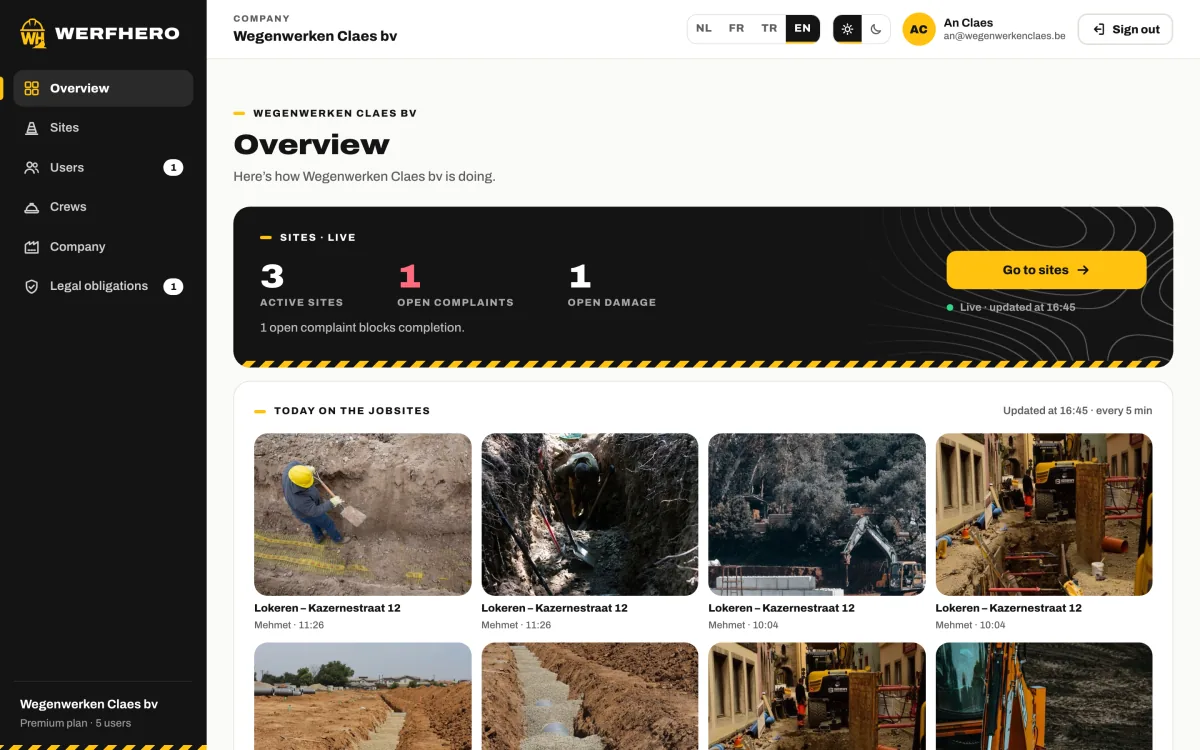
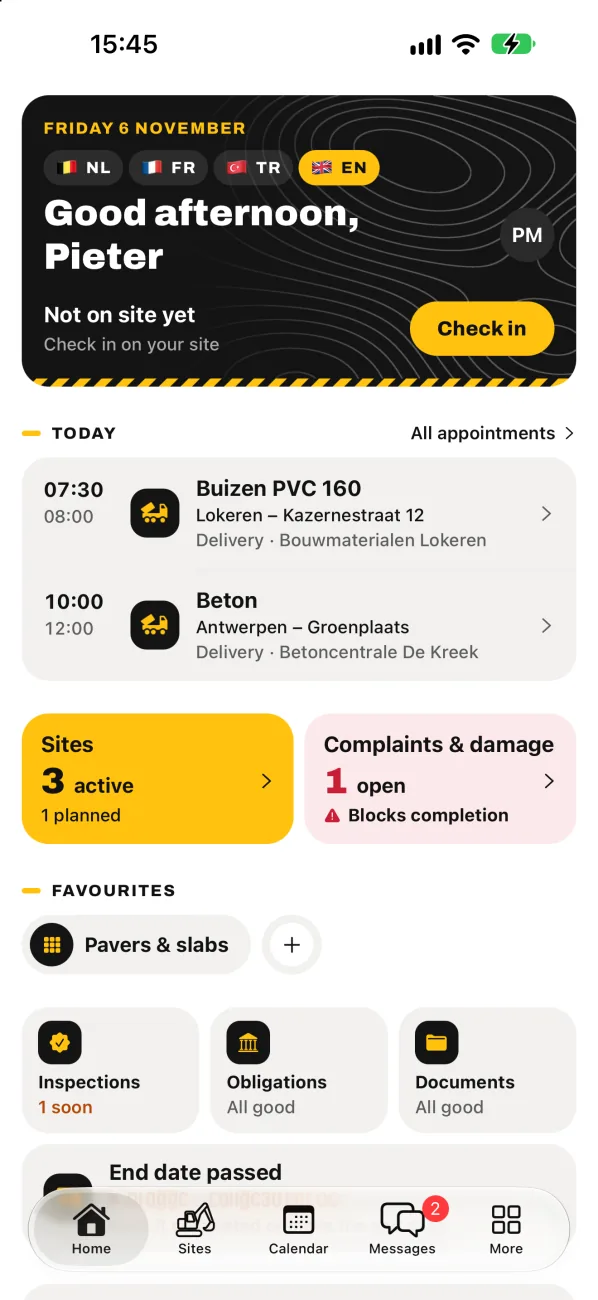
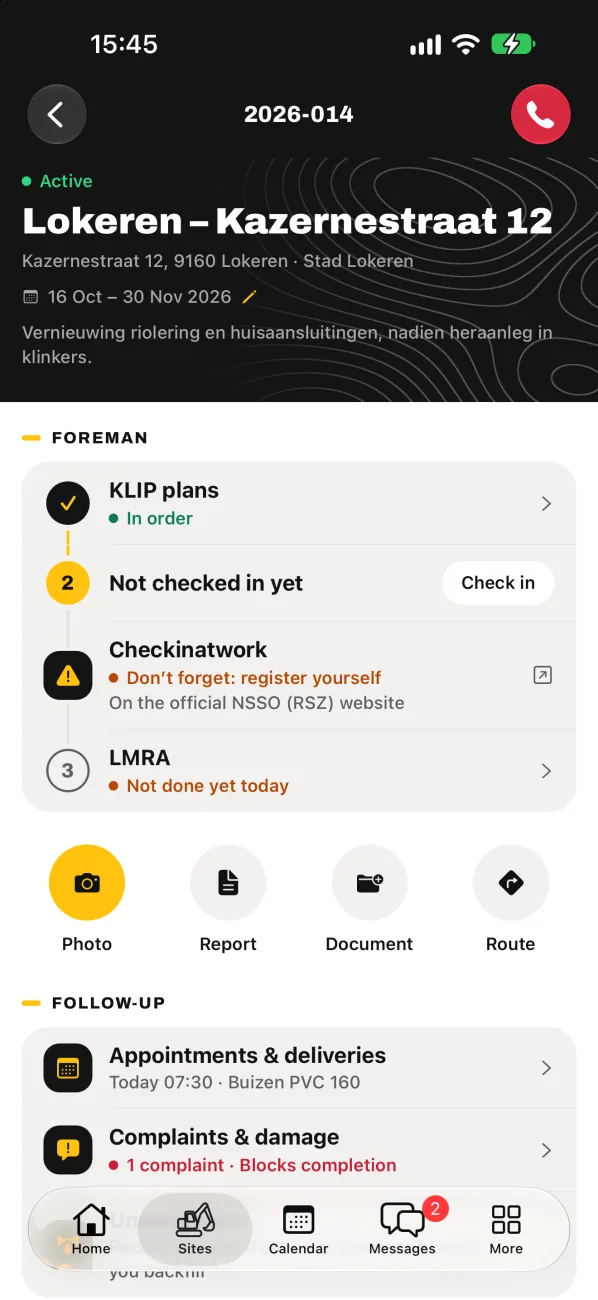
Sewers, utilities, roadworks, driveways and paving. WerfHero puts everything your crew needs on site in one app:. photos with GPS, the daily report, KLIP plans, LMRA, messages per crew and who is on which site. Even with no signal.
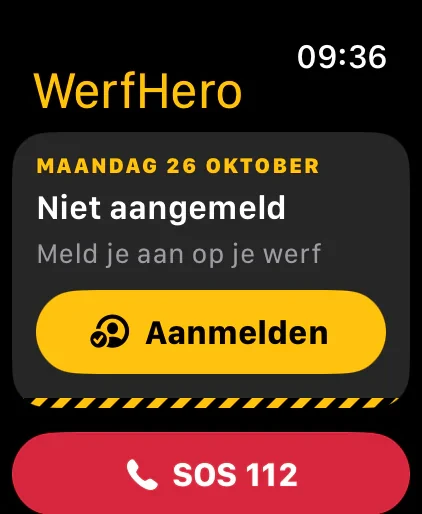
Gloves on, phone deep in your jacket? With the Apple Watch app you check in and check out on site with one tap on your wrist. Works together with the WerfHero app on your iPhone.
Check in and check out on site
Who’s where, for the admin
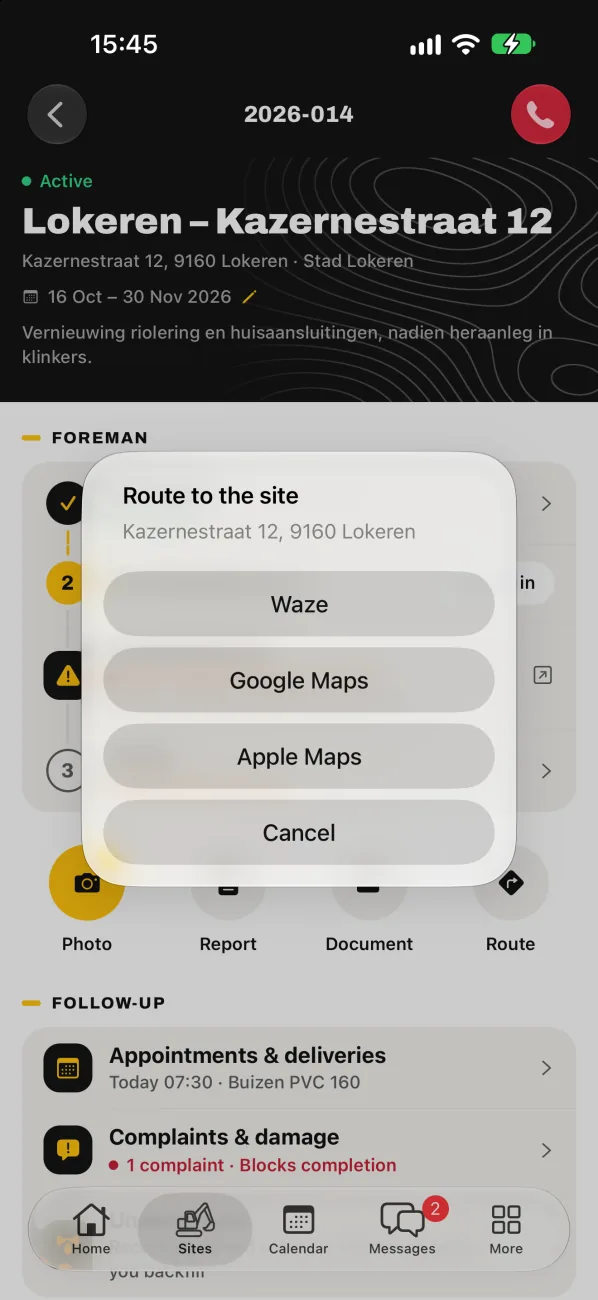
One tap to navigate to the site
SOS: call 112 from your wrist
For Apple Watch with watchOS 10 or later, together with the iPhone app. In Pro and Premium.
The problem
A site runs on agreements. Not on scraps of paper.
On site everything happens at once: the excavator is working, the pipes arrive too early, the network operator calls. There’s no time to fill in paperwork. And that’s exactly when you need proof afterwards.
Without WerfHero
Photos of the trench are spread over five phones. Nobody can find that one photo of the damage.
Daily reports on paper, and on Friday evening typing out all the hours again.
The KLIP plan is somewhere in a mailbox. Or it has already expired.
Agreements and delivery notes disappear into private WhatsApp groups.
A dispute about a damaged pipe or a sunken driveway? No proof.
Who is on which site today? You phone around to find out.
With WerfHero
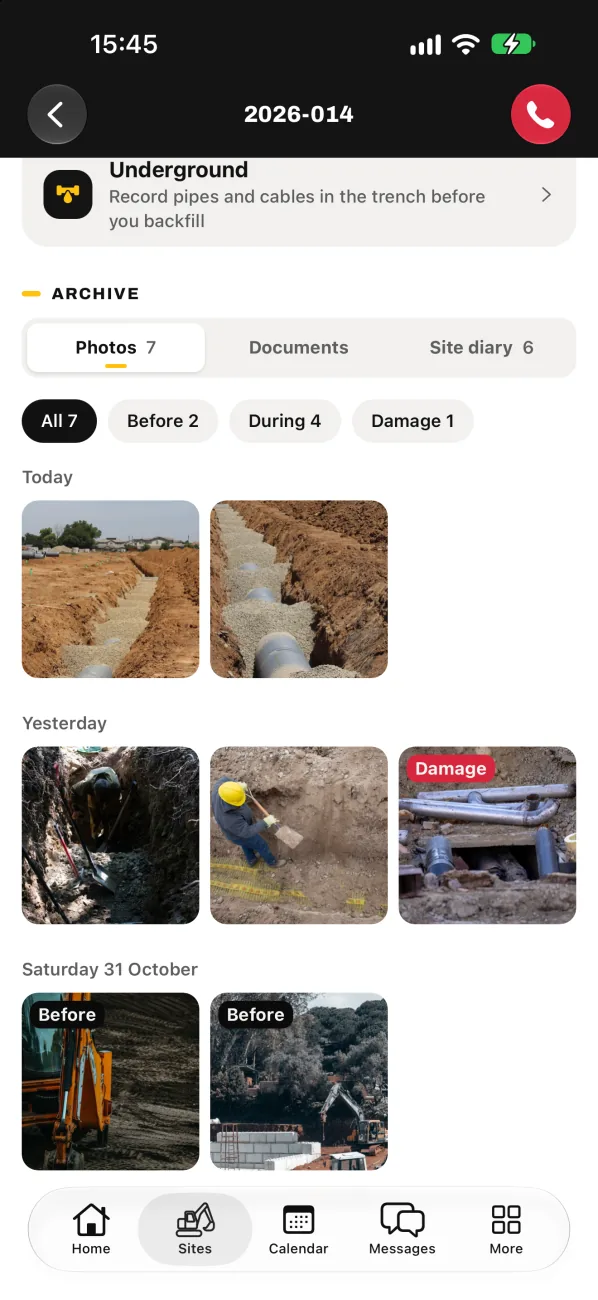
Every photo with the right site, with date and GPS, in Before, During, After and Damage.
Daily report filled in on site, as a PDF. The hours go straight to Excel.
KLIP per site, with a warning before it expires.
Messages per crew, in the company app. KLIP plans and delivery notes included.
Before, during and after photos you can put on the table in any dispute.
On the map you see who is checked in on which site. No GPS tracking.
How it works
One day on site. One app.
On the way
One tap and you’re driving to the site.
Waze, Google Maps or Apple Maps takes every driver right to the trench.
Arrival
KLIP plans in order? Then check in.
The site page shows right away whether the KLIP plans are in order. Then one tap on Check in.
Before digging
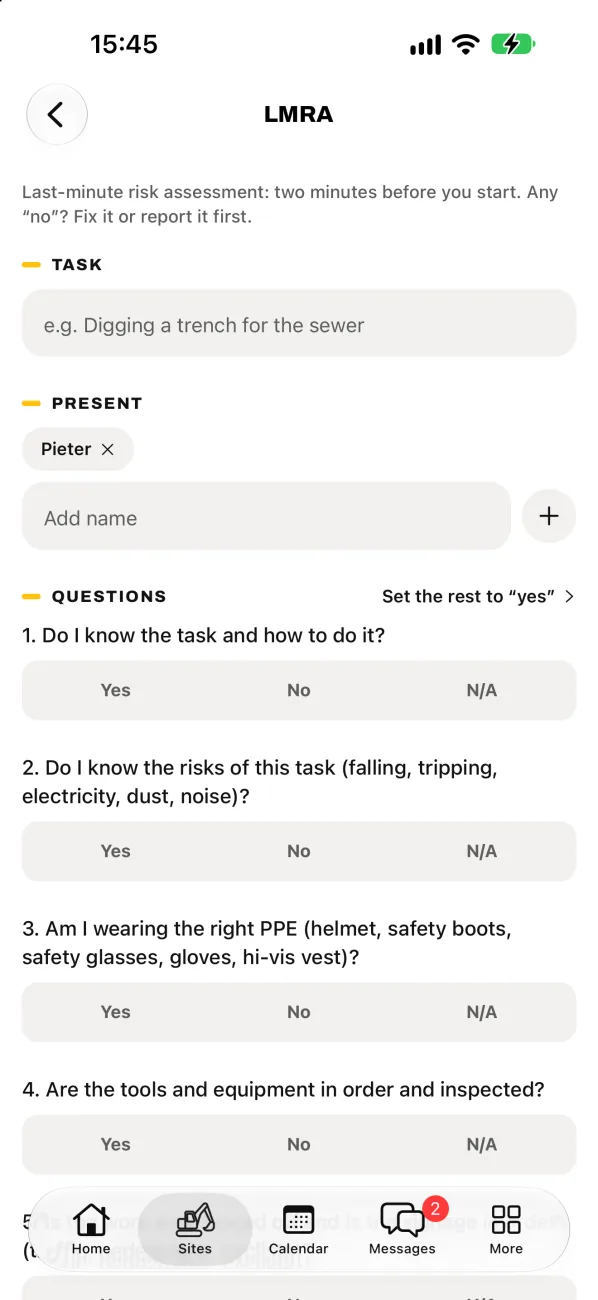
LMRA first. Then the bucket goes in.
Two minutes, filled in on site. If someone answers “no”, the works don’t start.
During the works
Every photo on the right site.
With date, time and GPS, sorted into Before, During, After and Damage. Your proof in every discussion.
Before you leave
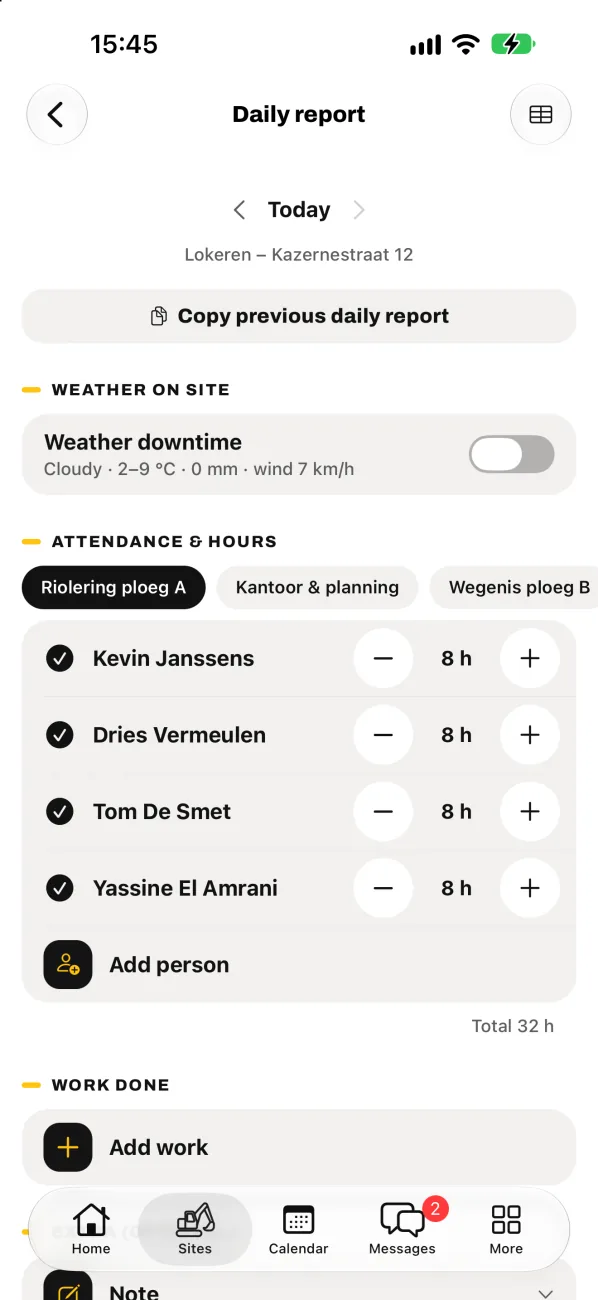
The daily report is done.
Crew, hours and work done in a few minutes, as a PDF. The hours go straight to Excel.
01
Features
On site
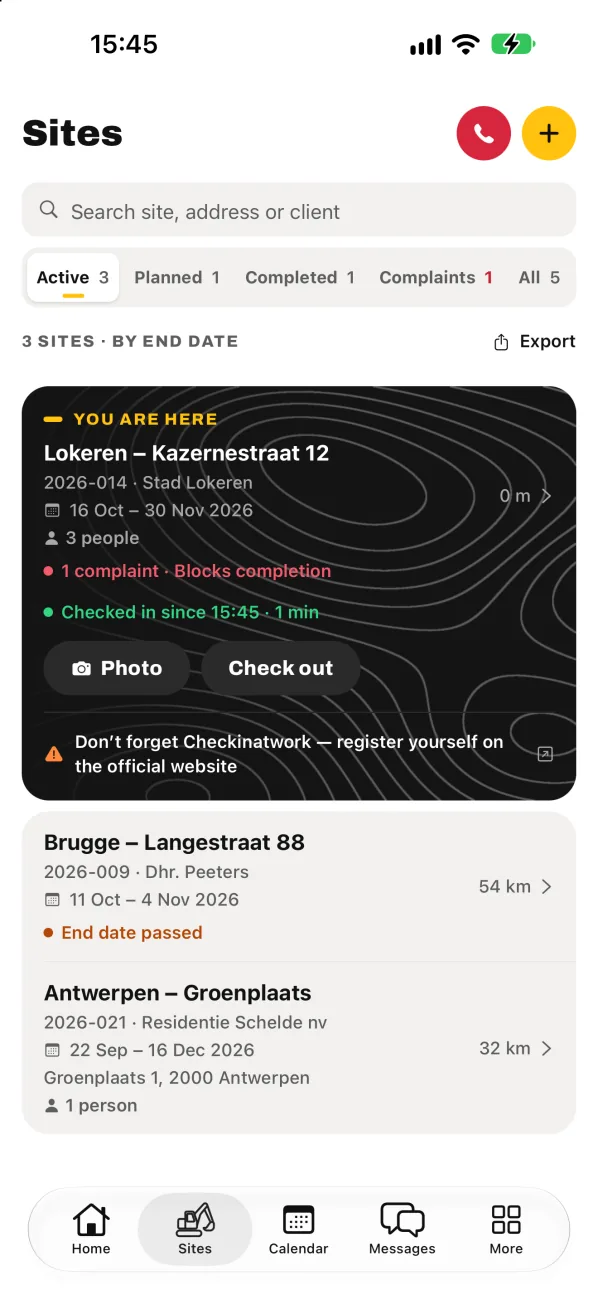
Sites & route
All your sites. One tap and you’re on your way.
Active, planned and completed sites in one clear list, with the distance from where you are. When you’re on a site, WerfHero puts it at the top. New driver or subcontractor? One tap and Waze, Google Maps or Apple Maps takes them right to the trench.
Status: active, planned or completed
Distance to every site
Route via Waze, Google Maps or Apple Maps
Who’s where New
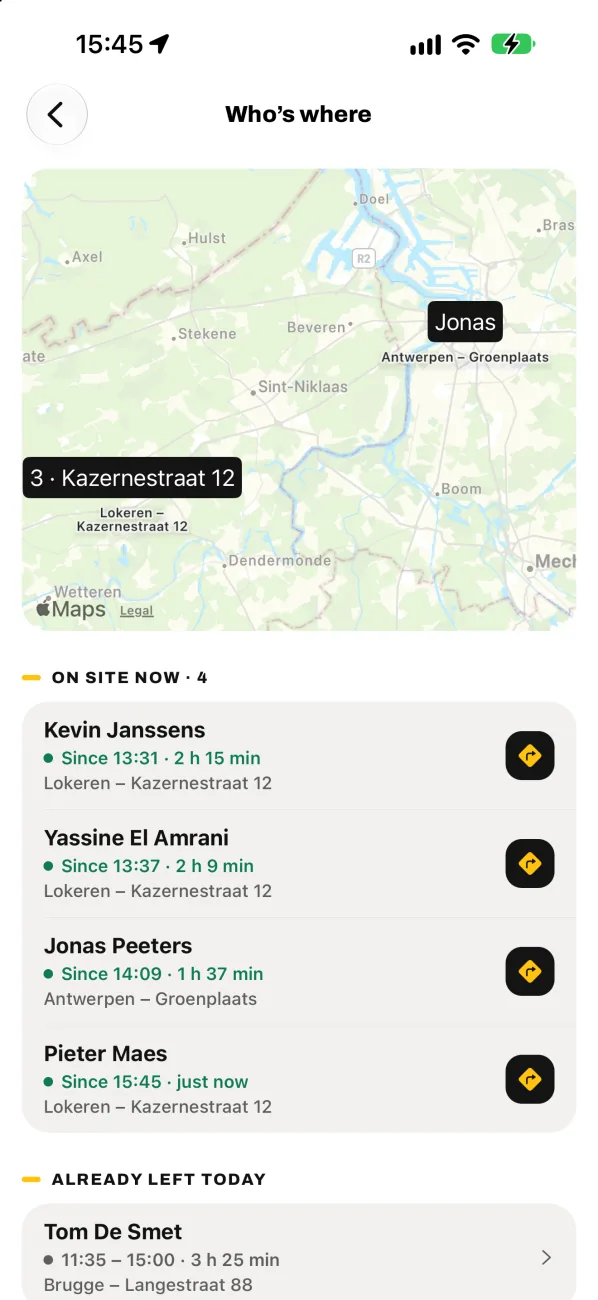
Who is on which site? One look at the map.
When the crew arrives, everyone taps Check in on the site. When the work is done, they tap Check out. As admin you see on the map who is on which site and since when, and who has already left today. Need to go there yourself? One tap and Waze, Google Maps or Apple Maps takes you there.
Check in and check out with one tap
Map of who is where, and since when
Who has already left today
In Pro and Premium
No GPS tracking. Only the site counts.
WerfHero doesn’t track anyone. You only see which site someone has checked in on. The phone’s location is only used on the device itself, to show the nearest site. This is not a Checkinatwork registration: you do that yourself on the official RSZ/NSSO site. WerfHero only reminds you.
Photos
Photos that prove what happened.
Every photo goes straight to the right site, sorted into Before, During, After the works and Damage. With date, time and GPS location. The resident says his driveway was fine before, or the network operator asks who hit that cable? Then you have the proof.
Your proof in every dispute.
Daily report
The daily report is done before you leave the site.
Crew, hours, work done, materials and the weather: filled in within a few minutes, as a clean PDF. Did the same work yesterday? Copy the previous report. Weather downtime is saved too. And with Export the hours go to Excel, no retyping.
Crew and hours per person
Work, materials and weather on site
PDF for the client, hours to Excel
02
Safety
Safe digging
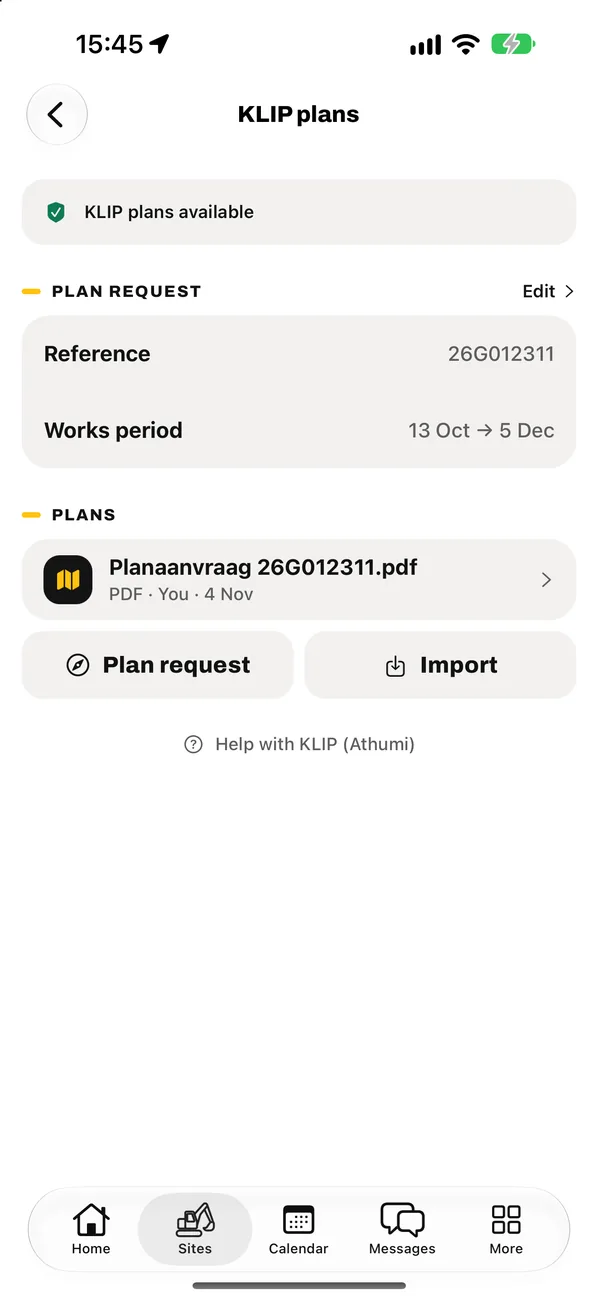
KLIP plans per site
No digging without a plan request.
For each site you see at a glance whether the KLIP plans are in order, about to expire or missing. You have the plans themselves at hand in the trench, not at the office. So the machine operator knows where the gas pipe runs before he puts the bucket in the ground.
In orderExpiring soonNo plan request
LMRA
LMRA first. Then the bucket goes in.
The LMRA (last-minute risk assessment, VCA) is ready in the app: task, people present and the questions. If someone answers “no”, WerfHero blocks the start of the works until the problem is solved or reported. Everything is saved with the site.
One “no”: fix it first.
Underground
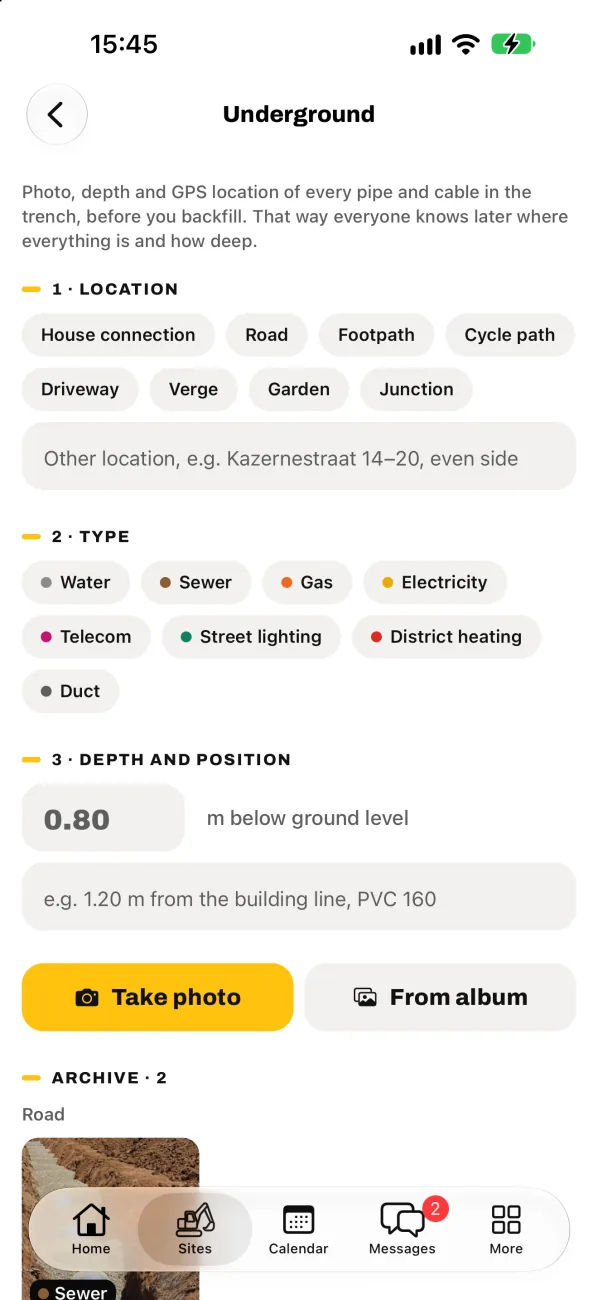
Record what’s about to disappear under the sand.
Before you backfill the trench: record every pipe and cable with photo, depth and GPS location. Water, sewer, gas, electricity, telecom, district heating. Afterwards you export everything as a “utility locations” PDF for the client, the city or the crew that has to dig there again in five years.
Photo, depth and GPS per pipe
Road, footpath, driveway, verge or junction
Export as a “utility locations” PDF
Inspections
See in time which inspection is about to expire.
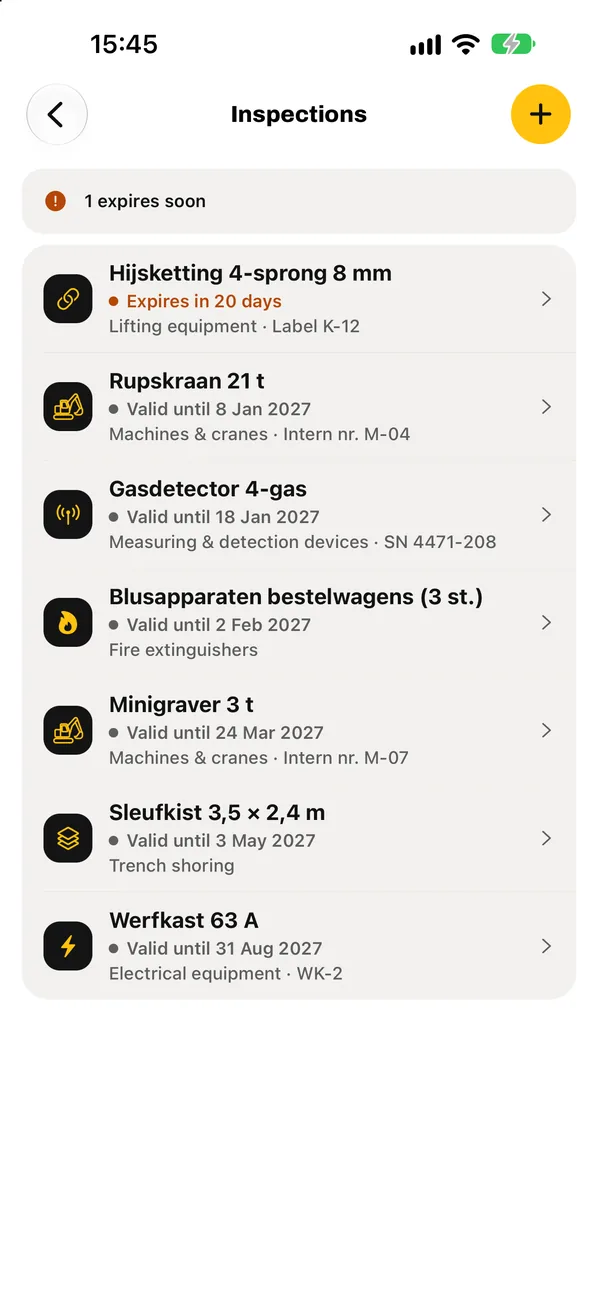
Crawler excavator, mini digger, lifting chains, fire extinguishers: everything in one inspection register. WerfHero warns you before an inspection expires. A check on site? The certificate is right there on your phone.
Machines and cranes, lifting equipment, fire extinguishers
Warning before the expiry date
Certificate at hand during a check
03
Team
Working together
Calendar
Deliveries, project owner and subcontractors in one place.
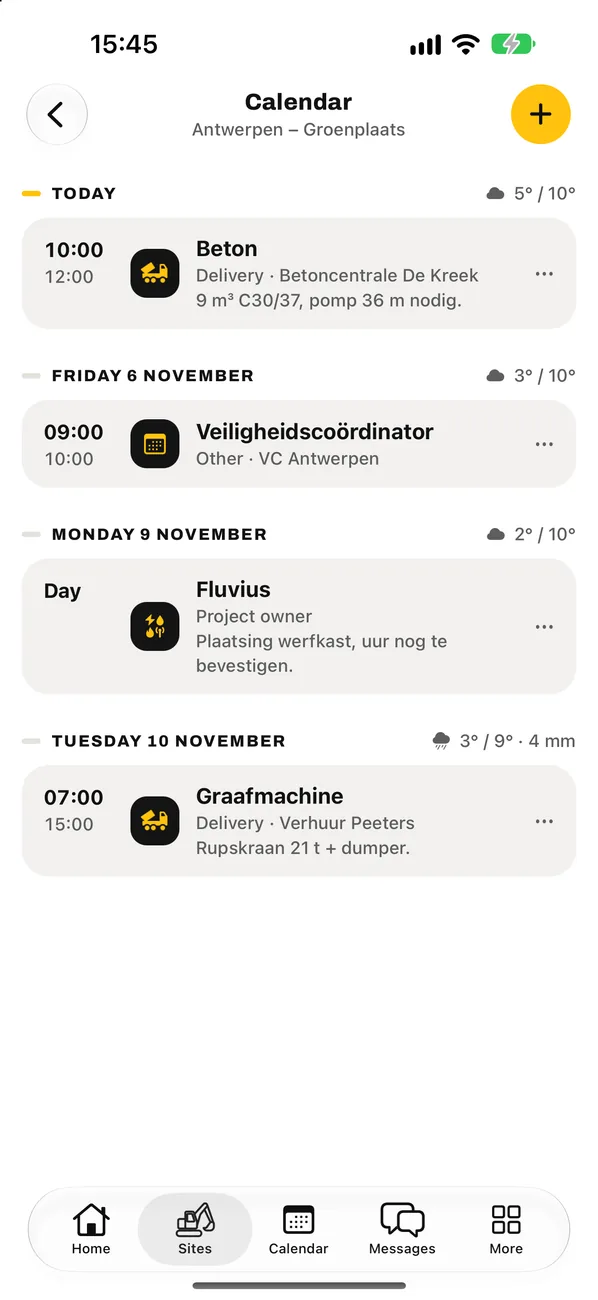
Concrete at half past seven, the network operator at ten, the safety coordinator tomorrow. For each site the whole crew sees the same calendar. With the weather forecast included, so you know in time when rain will spoil your concrete pour or your asphalting.
Deliveries, project owner, subcontractors and others
Warning for rain or wind
Messages
Messages per crew. No more private WhatsApp.
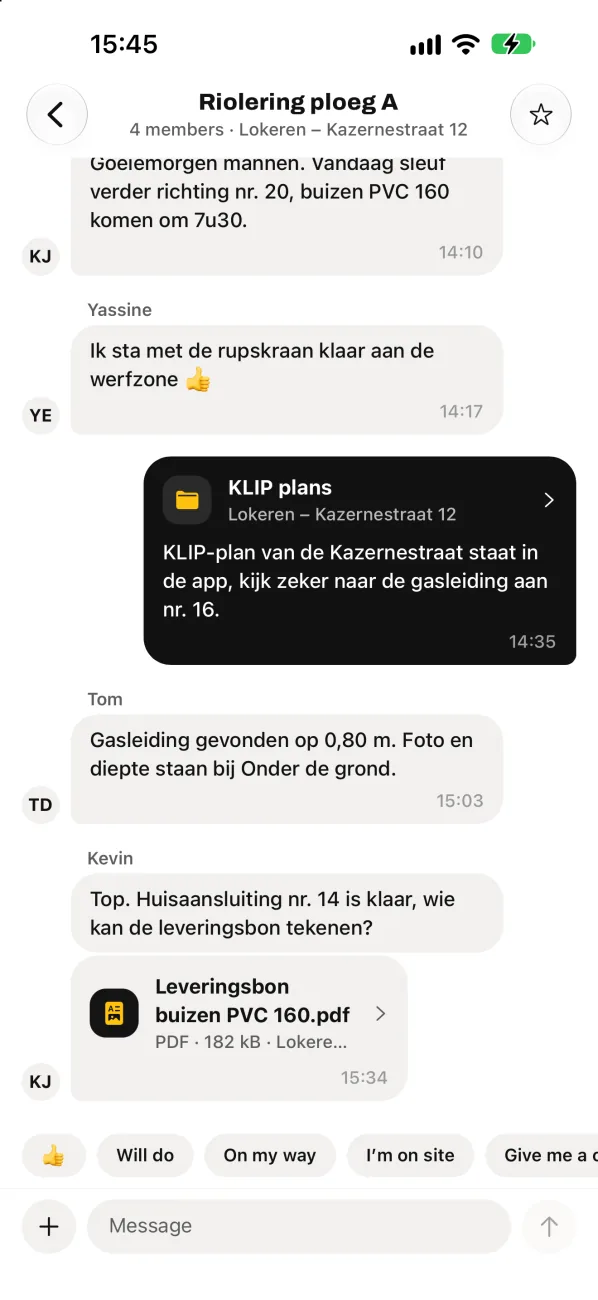
Chat with your crew or one-to-one. The admin decides who is in which crew: new people see the right conversations straight away, and people who leave take nothing with them. Share KLIP plans and delivery notes right in the conversation.
Site matters don’t belong on your private phone.
04
And more
Always at hand
Calculators
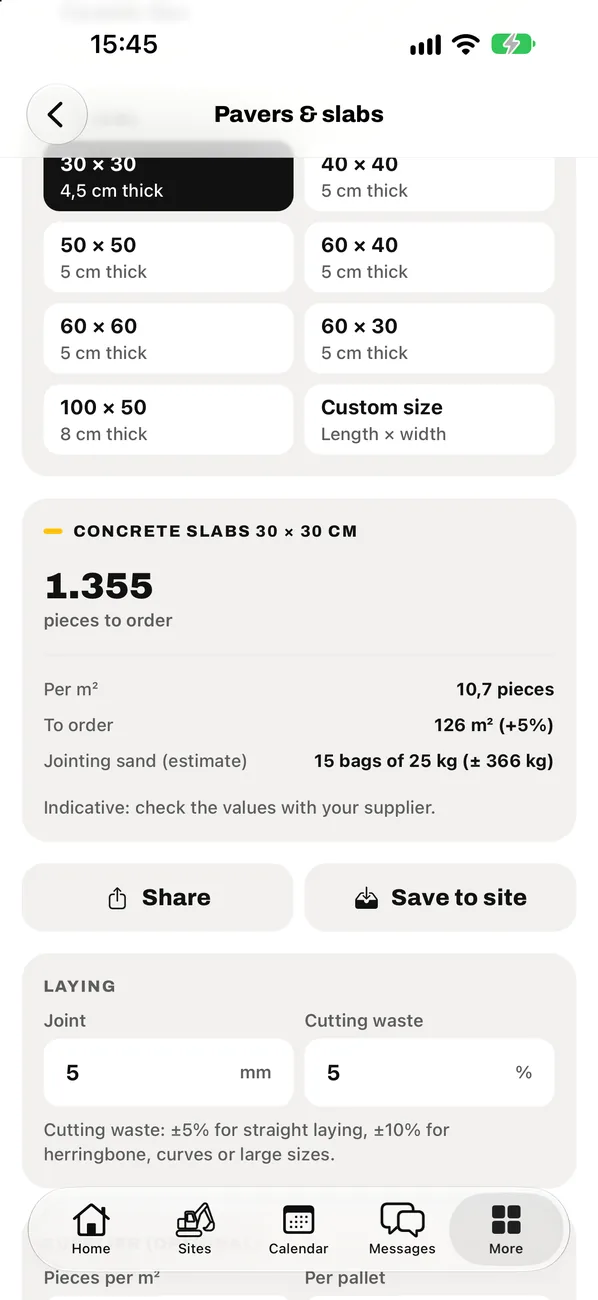
How many tonnes of crushed stone, how many loads, how many pavers and how much bedding sand? Work it out on site, not on a beer mat.
Pavers & slabs
Area m²
Material m³
Tonnes & loads
Trench
Concrete mix
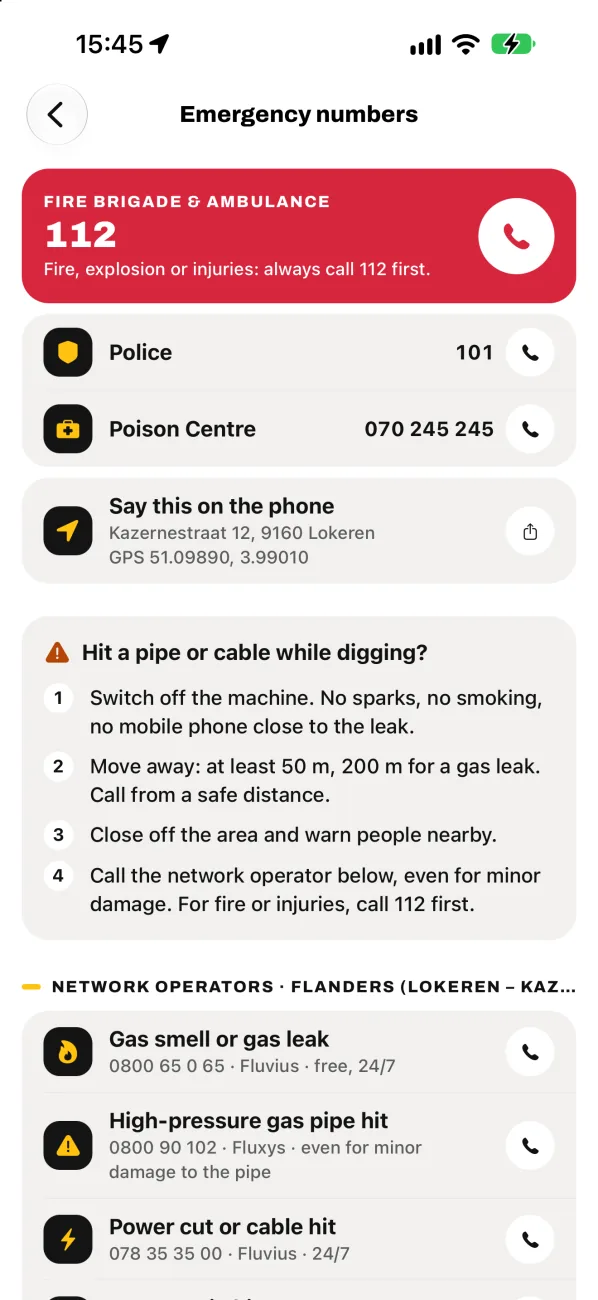
Emergency numbers
112
Hit a gas pipe? One tap to call 112, the police and the right network operator for where the site is. With the address and the GPS coordinates you need to give on the phone.
Documents
Your company’s official documents always at hand: insurance, registration certificate, VCA certificate. If someone asks for one on site, you show it straight away.
In your own language
Everyone in the crew picks their own language. Same site, same data.
Nederlands
Français
Türkçe
English
Manage from the office
On app.werfhero.be you manage everything from your computer as admin: who is in your crew, which sites someone sees, your seats and your subscription.
Works with no signal
No signal in the trench? No problem.
Three metres deep or in the middle of the fields: you just keep working. Photos, daily reports and documents are queued and sent automatically as soon as you have signal again.
Photos, daily reports, KLIP plans and jobsite documents go straight to your company’s OneDrive or SharePoint. Only the Legal obligations documents are kept on our server. You decide who has access. And if you ever stop using WerfHero, everything is still there.
SharePoint › WerfHero
2026-014 Lokeren – Kazernestraat 12
Photos › Before
Photos › During
Photos › After the works
Photos › Damage
Daily report 2026-10-24.pdf
Plans
Choose what your crew needs.
One fixed price per company, with users included. Try WerfHero free for 7 days, with your own sites and your own crew.
Always included
Sites
Photos
Documents
Route
Uploads with no signal
Emergency numbers
Basis
For the small crew that wants everything digital and in order.
Launch offer until 31 March 2027
€290€263.90first year
30% off 3 months (−€26.10), then €290 per year: €58 less than monthly.
1 user included · billed yearly · excl. VAT
1 user · 4 crews
Daily report + hours to Excel
KLIP plans per site
Messages with your crew
10 photos per site per dayDamage photos always unlimited
Recommended
Pro
For companies with several crews and lots of deliveries.
Launch offer until 31 March 2027
€490€445.90first year
30% off 3 months (−€44.10), then €490 per year: €98 less than monthly.
3 users included · billed yearly · excl. VAT
Everything in Basis, plus
3 users · 8 crews
Unlimited photos
Check in/out, Who’s where, Apple Watch
Calendar, LMRA and Underground (PDF)
Inspections, company documents and calculators
Set sites per crew member
Premium
For companies with many crews and sites at the same time.
Launch offer until 31 March 2027
€990€900.90first year
30% off 3 months (−€89.10), then €990 per year: €198 less than monthly.
5 users included · billed yearly · excl. VAT
Everything in Pro, plus
5 users · unlimited crews
Help setting up your sites and crews
Dedicated contact person
Priority for new tools and integrations
Custom
For large companies with more than 25 users or many crews at the same time.
Price on request
Custom
Based on the number of crews and users in your company.
All prices per company, excluding VAT. Pay yearly = pay for 10 months, get 2 months free. Launch offer for new customers who start their subscription on or before 31 March 2027: 30% off your first 3 paid months (yearly: deducted once from your first yearly invoice), then the regular price. Try free for 7 days first, no payment details needed; the 3 discounted months only start with your first payment. Need more users? Ask for a price.
Questions
Frequently asked.
Which devices does WerfHero work on?
On iPhone and iPad, and with the Apple Watch app also on your wrist. Android is coming soon to Google Play. As admin you can also manage your crew, your seats and your subscription from your computer, at app.werfhero.be.
Where are our photos and documents stored?
In your own company’s Microsoft 365, in OneDrive or SharePoint. WerfHero doesn’t store your jobsite photos, daily reports or KLIP plans on its own servers. Our server only holds what the app needs to work: accounts, crews, messages, check-ins and the Legal obligations documents (such as insurance and VCA certificate). Read more in our privacy policy.
Do we need Microsoft 365?
Yes. Your files go to your company’s OneDrive or SharePoint. Most companies already have it for their email. Not sure? Email info@werfhero.be and we’ll look at it together.
What if there’s no signal on site?
Then you just keep working. Photos, daily reports and documents go into a queue and are sent automatically as soon as you have signal again. You can always see what still has to go.
What does WerfHero cost?
You pay a fixed price per company, excluding VAT: Basis €29 per month (1 user, 4 crews), Pro €49 (3 users, 8 crews) and Premium €99 (5 users, unlimited crews). Pay yearly and you get 2 months free: €290, €490 or €990 per year. Launch offer: start your subscription as a new customer on or before 31 March 2027 and you get 30% off your first 3 paid months (Basis, for example, €20.30 instead of €29 per month). Pay yearly and the same amount comes off your first yearly invoice once (Basis €263.90 for the first year instead of €290). After that you pay the regular price. You can try WerfHero free for 7 days first, no payment details needed. Need more users? Then we make you a custom price. Everything is listed under Plans. More than 25 users? Email info@werfhero.be.
Does WerfHero track my workers with GPS?
No. In Who’s where you only see which site someone has checked in on, and since when. No route or position is recorded. The phone’s location is only used on the device itself, to show the nearest site, and is not sent to WerfHero.
Can my workers use the app in their own language?
Yes. The app is available in Dutch, French, Turkish and English. Everyone picks their own language.
Who sees which sites and messages?
Your company’s admin decides who is in which crew and who has access. If someone leaves the company, you switch off their access and all photos and messages stay with the company.
Does WerfHero request the KLIP plans for me?
No. You still make the plan request via KLIP. WerfHero stores the plans per site, shows whether they are in order, about to expire or missing, and makes sure your crew has them at hand on site.
How do you sign in?
With your email address. You get a code in your mailbox, which you enter in the app. No password to remember. Admins sign in the same way at app.werfhero.be.
Be the hero of your site.
Try WerfHero free for 7 days with your own sites and your own crew. No installation needed at the office.